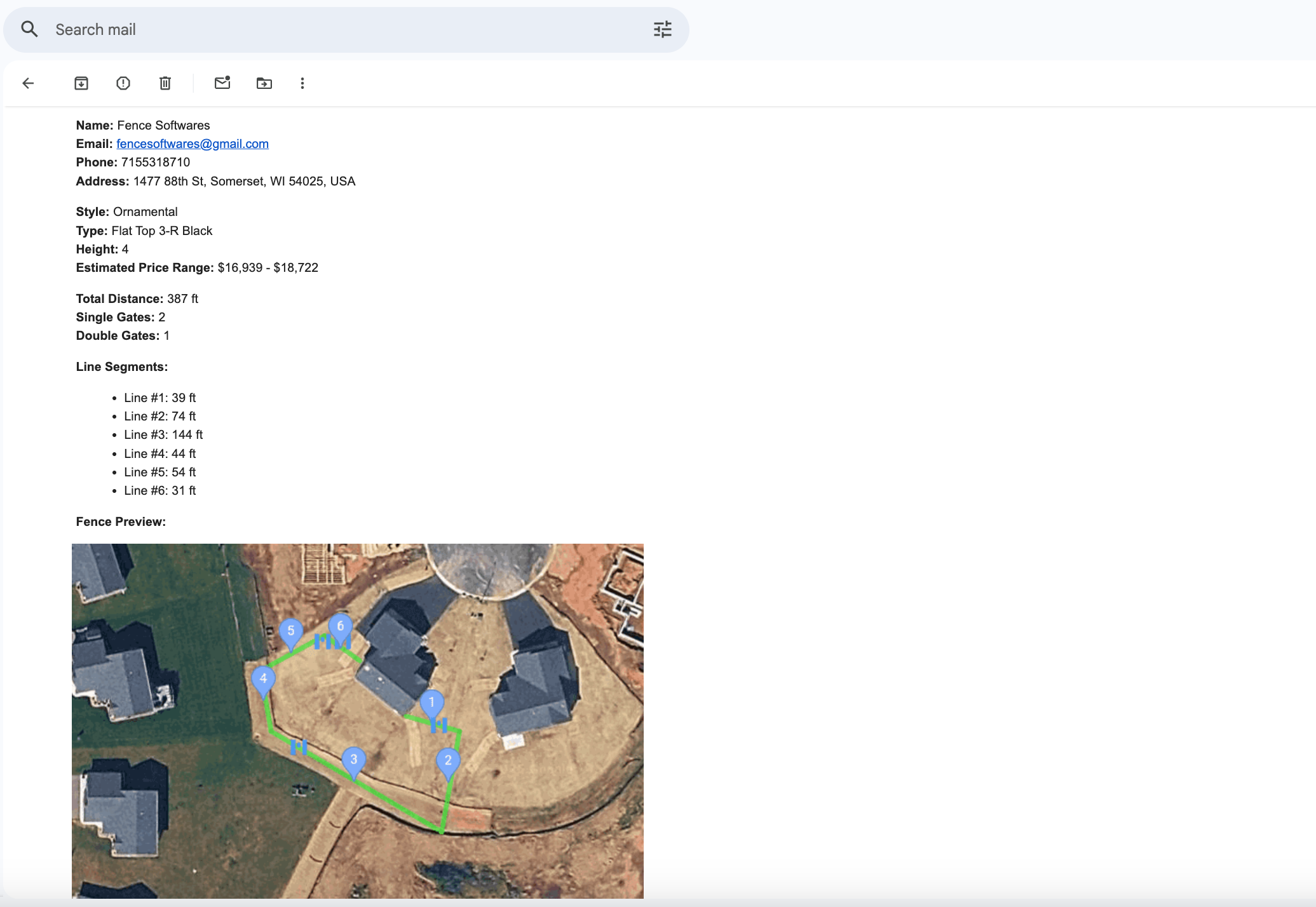
This is the layout and information your office sees when a homeowner submits. You get the fence path, footage, gate locations, options selected, and contact details in a clean format.
Fence Drawing Tool sits on top of your existing website. Homeowners find their property on a live map, trace their fence line, place gates, pick style and height, and submit a layout with their contact info so you can quote in minutes instead of burning hours on drive‑by estimates.
Already a customer? Log in here.
This is exactly what a homeowner sees when they click your “Draw your fence” button: address search, map‑based drawing, gates, fence options, and a simple submit step.
Show prospects the real screens on both sides of a Fence Drawing Tool submission.
This is the layout and information your office sees when a homeowner submits. You get the fence path, footage, gate locations, options selected, and contact details in a clean format.
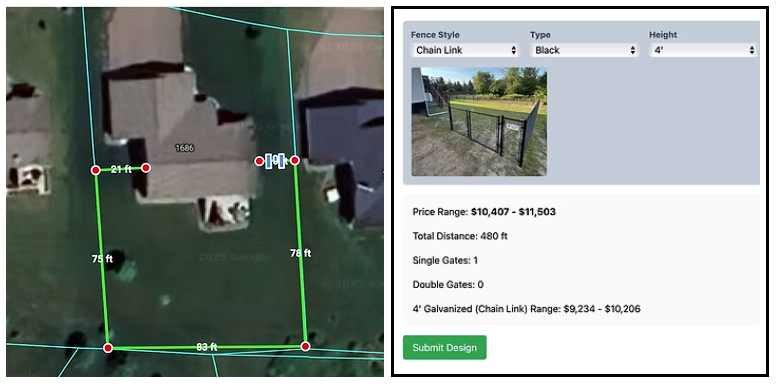
This is the confirmation screen your customer sees after they draw their fence and hit submit. It reassures them that their request is in and shows them what will happen next.
Replace these screenshots with views from your own account so fence companies can see the exact workflow you're offering them.
You add a “Draw your fence” link or button. Fence Drawing Tool handles the map, drawing, and lead capture.
A homeowner clicks your “Draw your fence” or “Get online quote” call‑to‑action. They are taken straight into your Fence Drawing Tool page with your branding and fence options.
They enter their address in the search bar or tap the use‑location button. The map jumps to their yard so they are instantly looking at the right property.
They tap points around the yard to draw fence segments, add single or double gates, then pick fence style, type, and height. The system keeps track of footage and price as they go.
Once they hit submit, their layout and contact information are passed through to your company so you can follow up with a real quote instead of chasing vague “ballpark” requests.
Less windshield time, more serious projects, and a smoother experience for homeowners.
If someone is willing to draw their yard, choose a style, and give you a real address, they are far more serious than a one‑line “How much for a fence?” message.
You see the layout, footage, and gate locations immediately. That lets you price and email a professional quote without burning a morning driving across town to look at a basic yard.
Instead of filling out a boring contact form, they interact with a live map built for fence work. That gives them confidence that you are organized, modern, and easy to deal with.
Crews can see layout drawings and notes before they ever arrive on site, helping them load the right materials and avoid surprises around gate locations and yard layout.
Pair Fence Drawing Tool with your existing ads, SEO, and yard signs. Send traffic to a link that actually converts instead of yet another generic “contact us” page.
You do not have to hire developers or maintain your own mapping software. Fence Drawing Tool is maintained and updated for you so you can stay focused on installs and crews.
No complicated tiers or per‑lead charges.
Billed monthly. Subscription renews automatically until you cancel through your account settings. Full billing details are in the Terms & Conditions.
Sales contact
Prefer to speak with a person? Use either option below and mention that you run a fence company and want Fence Drawing Tool on your website:
Email: fencesoftwares@gmail.com
Phone: 715-531-8710
After you sign up, you receive access to the company portal so you can manage your link and account details.
Share a few details about your fence business and we'll reach out with a live walkthrough and answer any questions about how Fence Drawing Tool would fit into your sales process.
Fill this out and we'll contact you using the details below.
Straight answers so you know what you are getting into.
This is for fence companies that install residential or light commercial fence and want a more efficient way to handle quote requests. If you run crews and trucks and your website is not pulling its weight, this is built for you.
Most companies add a prominent “Draw your fence” or “Get online quote” button on their home page and contact page that links to their Fence Drawing Tool URL. If you already have a web contractor, they can wire this in quickly by adding that link.
No. Fence Drawing Tool handles map‑based drawing and lead capture. You can continue using whatever CRM, spreadsheet, or estimating system you already rely on, and treat each submission as a detailed lead that feeds into your existing process.
No. Fence Drawing Tool is a layout and estimating tool only. The property lines shown are approximate and not a certified survey. Customers should still confirm boundaries, easements, and local rules the same way they always have.
Billing is handled as a subscription with automatic renewal. You can cancel before your next billing period through your account so future charges stop. All sales are otherwise treated as final, in line with the Terms & Conditions.
Yes. The fence drawing experience is built so homeowners can tap to place points, add gates, and submit their information from a phone, tablet, or desktop, which is critical because many homeowners will find you on mobile first.